
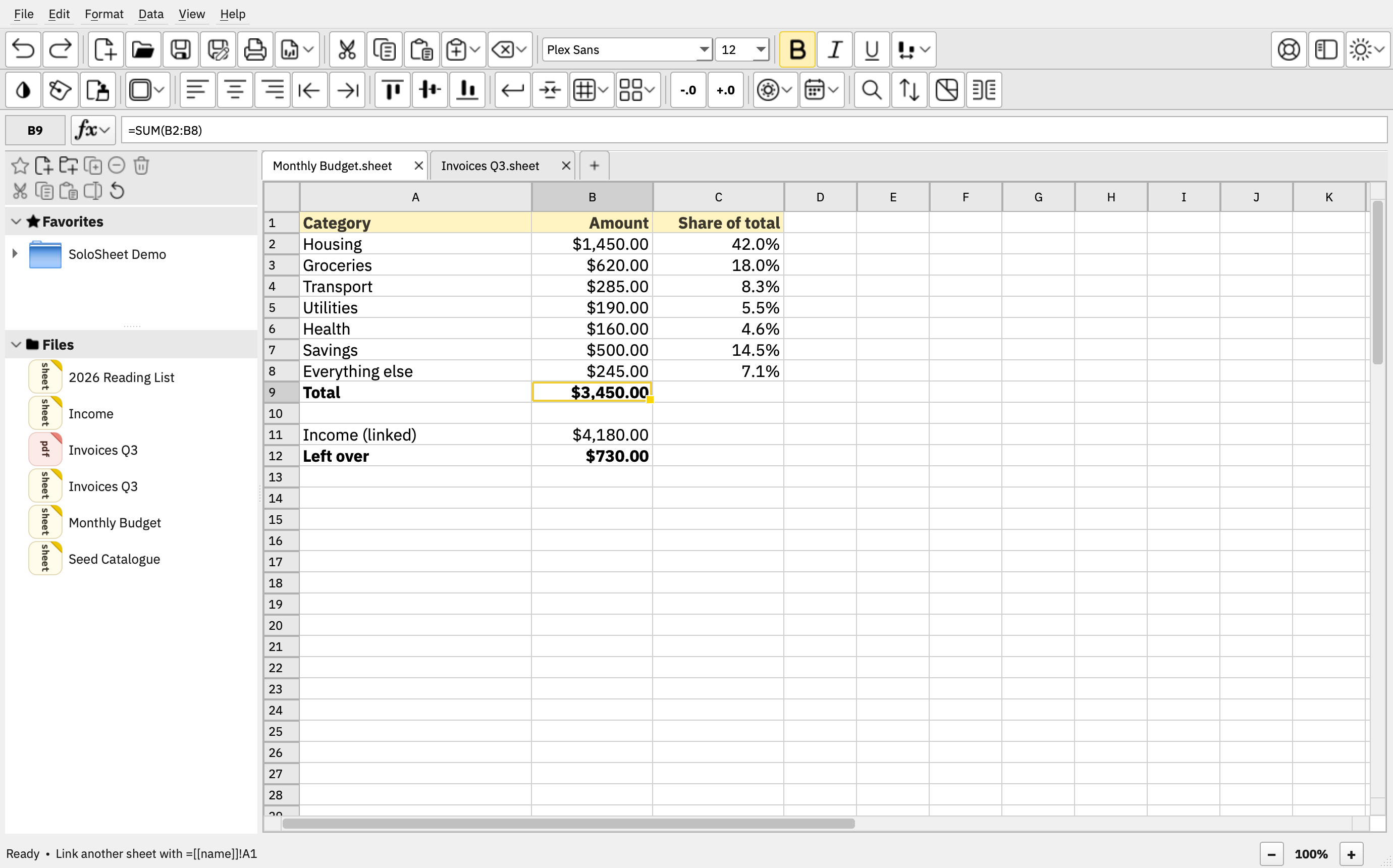
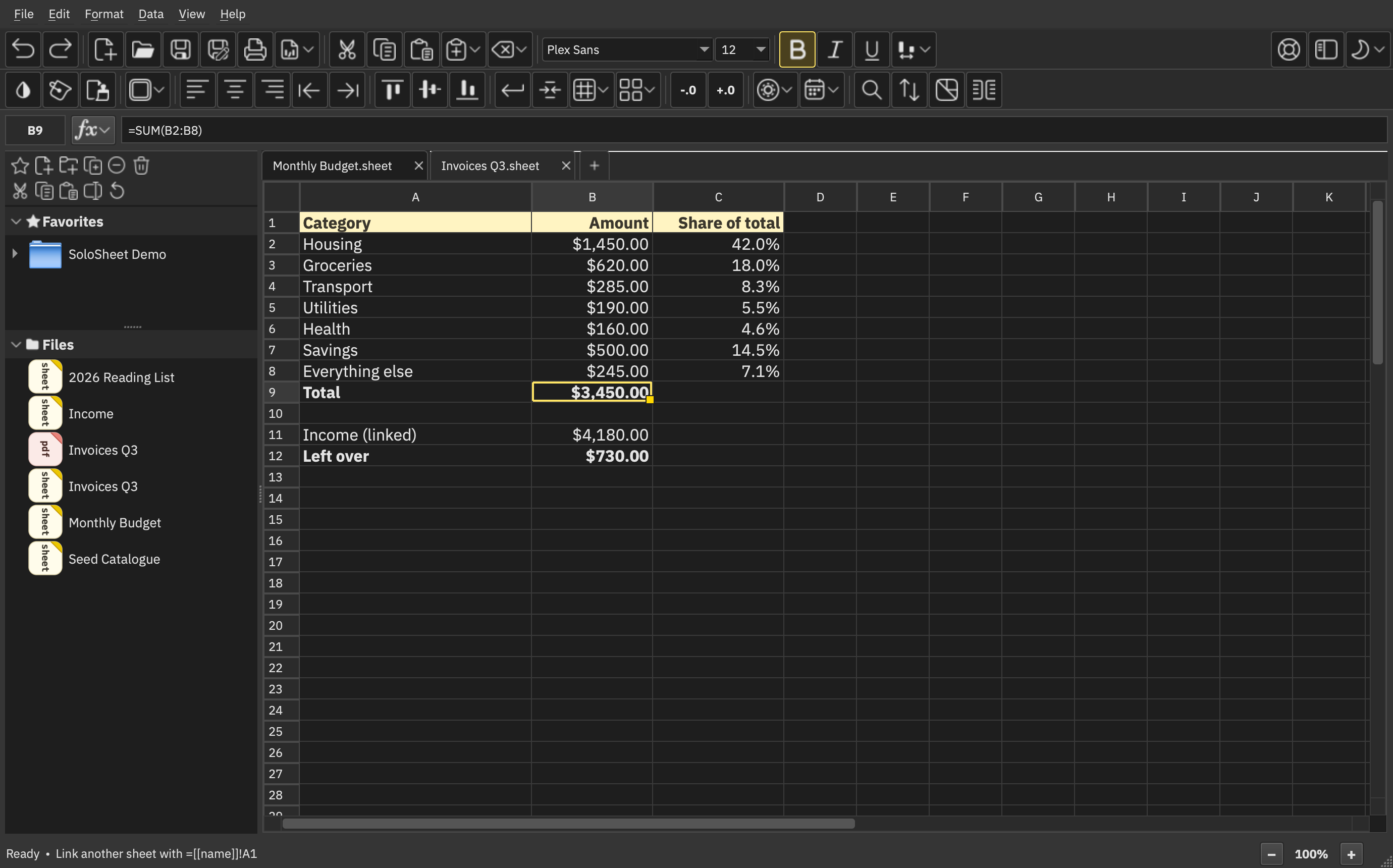
A spreadsheet program built on the open .sheet format. Each .sheet file is a single spreadsheet, linkable to others with wiki-style links. No lock-in. No bloat. No XML blobs. Just spreadsheets the way they should be.
More about SoloSheet →
SoloGrove
Local, private, lean software for going solo
Linux · BSD · macOS · Windows
The software
A Typst editor with native rendering — no webview. Ships with full Hebrew, Greek, and Latin font support. Local, lean, and Unix-friendly.
More about SoloTyp →
The shared foundation under every SoloGrove program: Qt, Python, and PySide. One experience on Linux, BSD, macOS, and Windows — multilingual by design, with full right-to-left support built in.
More about SoloCore →
The .sheet format
.sheet is an open standard for spreadsheets designed in-house — lean and parseable into other data formats, vendor-neutral, and AI-friendly. Clean, structured JSON: your data stays yours, usable however you want.
Read the .sheet specification →Why SoloGrove
Open source (GPL), 100% offline, zero telemetry. No: analytics, cloud, ads, upsells, paywalls, accounts, or subscriptions — just you and your data.
Built from scratch & cross-platform. Lean, fast performance everywhere — not: a Java program, an Electron-wrapped web app, or a re-skin of an existing office suite.
 Coming soon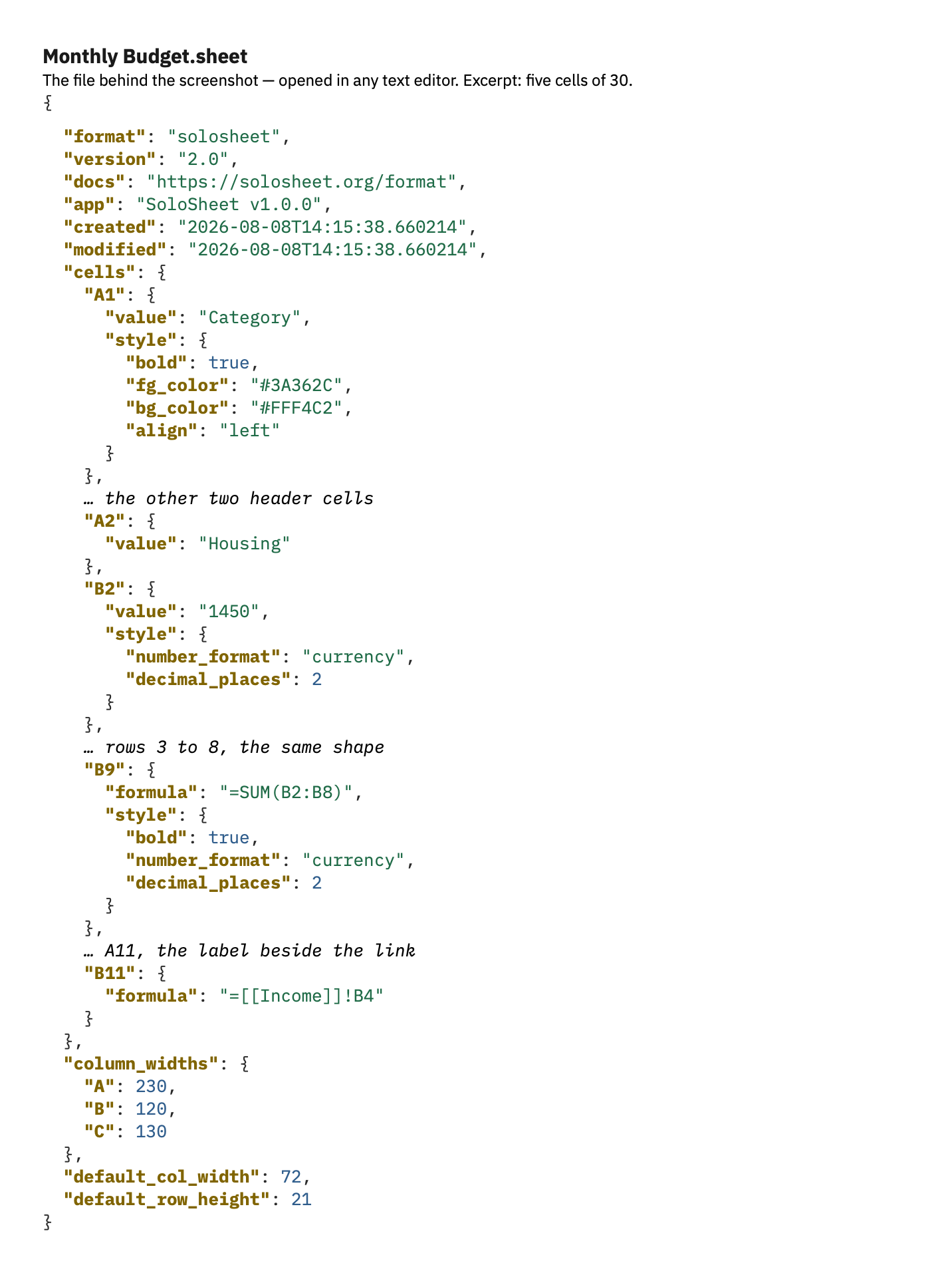
Get SoloGrove
SoloSheet {{ sheetVersion }} · SoloTyp {{ typVersion }}
Release feeds: SoloSheet RSS · SoloTyp RSS
Linux
SoloSheet
SoloTyp
Minimum requirements
x86_64Debian 12+, Ubuntu 22.04+, Fedora 35+, RHEL/Alma/Rocky 9+, Arch, Tumbleweed, KaOS, Void, Mageia, PCLinuxOS, Solus, plus most other distros that meet glibc ≥ 2.34 & Python ≥ 3.10
ARM64 (aarch64)Ubuntu 24.04+, Debian 13+, Fedora 40+, Raspberry Pi OS trixie, plus most other distros that meet glibc ≥ 2.39 & Python ≥ 3.10
Check your system: glibc ldd --version · Python python3 --version
Package manager
{{ linuxHdrSheet }}
{{ pmCmd }}
pipx install solosheet && solosheet-desktop install
# If zsh asks to correct 'pipx' to 'popd' — answer n (pipx isn't on the PATH yet, so zsh fuzzy-matched the unknown command)
pipx ensurepath
{{ linuxHdr2Sheet }}
python3 -m pipx ensurepath
pipx install solosheet
pipx ensurepath
pipx install solosheet && solosheet-desktop install
pipx ensurepath
# Step 3 of 4 — restart the shell
exec $SHELL
# Step 4 of 4 — in the restarted terminal
pipx install solosheet && solosheet-desktop install
solosheet-desktop install
# Run SoloSheet — from terminal, or the menu entry that was created
solosheet
# Check the installed version
solosheet --version
# Update SoloSheet
pipx upgrade-all
# Remove SoloSheet
solosheet-desktop uninstall && pipx uninstall solosheet
# If a system Python upgrade breaks SoloSheet — repair
pipx reinstall-all
{{ linuxHdrTyp }}
{{ pmCmd }}
pipx install solotyp && solotyp-desktop install
# If zsh asks to correct 'pipx' to 'popd' — answer n (pipx isn't on the PATH yet, so zsh fuzzy-matched the unknown command)
pipx ensurepath
{{ linuxHdr2Typ }}
python3 -m pipx ensurepath
pipx install solotyp
pipx ensurepath
pipx install solotyp && solotyp-desktop install
pipx ensurepath
# Step 3 of 4 — restart the shell
exec $SHELL
# Step 4 of 4 — in the restarted terminal
pipx install solotyp && solotyp-desktop install
solotyp-desktop install
# Run SoloTyp — from terminal, or the menu entry that was created
solotyp
# Check the installed version
solotyp --version
# Update SoloTyp
pipx upgrade-all
# Remove SoloTyp
solotyp-desktop uninstall && pipx uninstall solotyp
# If a system Python upgrade breaks SoloTyp — repair
pipx reinstall-all
Note: glibc floors are current as of PySide6 6.11.
Note: musl distributions are not supported — PySide6 publishes no musl wheels.
Note: RHEL 9 clears the glibc bar but ships Python 3.9; it needs dnf install python3.12.
Note: if you prefer UV, download UV manually from docs.astral.sh/uv/ and then follow the Windows instructions.
Note: exec $SHELL covers bash, zsh, and fish — if $SHELL is unset, close and reopen the terminal instead.
Note: on Void the two xdg-desktop-portal packages are optional — Void is a minimal base, so more individual packages are named than on other distros.
BSD
SoloSheet
SoloTyp
Minimum requirements
FreeBSD and derivatives (GhostBSD, etc.) — 14 or newer with an up-to-date pkg/ports tree.
# Step 1 of 4 — install pipx (asks for your password)
sudo pkg install py312-pipx py312-pyside6
# Step 2 of 4 — install SoloSheet
pipx install --system-site-packages solosheet
pipx ensurepath
# Step 3 of 4 — restart the shell
exec $SHELL
# Step 4 of 4 — in the restarted terminal
solosheet-desktop install
# Run SoloSheet — from terminal, or the menu entry that was created
solosheet
# Check the installed version
solosheet --version
# Update SoloSheet
pipx upgrade-all
# Remove SoloSheet
solosheet-desktop uninstall && pipx uninstall solosheet
# If a system Python upgrade breaks SoloSheet — repair
pipx reinstall-all
# Step 1 of 4 — install pipx (asks for your password)
sudo pkg install py312-pipx py312-pyside6
# Step 2 of 4 — install SoloTyp
pipx install --system-site-packages solotyp
pipx ensurepath
# Step 3 of 4 — restart the shell
exec $SHELL
# Step 4 of 4 — in the restarted terminal
solotyp-desktop install
# Run SoloTyp — from terminal, or the menu entry that was created
solotyp
# Check the installed version
solotyp --version
# Update SoloTyp
pipx upgrade-all
# Remove SoloTyp
solotyp-desktop uninstall && pipx uninstall solotyp
# If a system Python upgrade breaks SoloTyp — repair
pipx reinstall-all
Note: Ports current versions are Python 3.12 & Qt 6.11.1 for FreeBSD — no need to check versions.
Note: the Qt installation from Ports installs the entire Qt framework "one Qt package" — there is no way to install only the needed parts, so the four Qt developer programs will also be installed.
Note: UV does not currently publish the needed wheels for BSD, so UV does not work. Note: other BSD operating systems are in testing. Note: exec $SHELL covers bash, zsh, and fish — if $SHELL is unset, close and reopen the terminal instead.
Note: UV does not currently publish the needed wheels for BSD, so UV does not work. Note: other BSD operating systems are in testing. Note: exec $SHELL covers bash, zsh, and fish — if $SHELL is unset, close and reopen the terminal instead.
macOS
Minimum requirements
macOS 15 (Sequoia) or later, Apple Silicon.
# Step 1 of 2 — download and verify (Terminal)
V=$(curl -fsS https://get.sologrove.org/pypi.json | grep -o '"solosheet": *"[^"]*"' | cut -d'"' -f4)
curl -fLO https://dl.sologrove.org/solosheet/$V/SoloSheet-$V-arm64.dmg
curl -fLO https://dl.sologrove.org/solosheet/$V/SHA256SUMS
shasum -a 256 -c SHA256SUMS --ignore-missing
# Step 2 of 2 — install
hdiutil attach SoloSheet-$V-arm64.dmg
cp -R "/Volumes/SoloSheet/SoloSheet.app" /Applications/
hdiutil detach "/Volumes/SoloSheet"
# Check the installed version
/Applications/SoloSheet.app/Contents/MacOS/SoloSheet --version
# Update SoloSheet — remove the old app, then re-run steps 1 & 2
rm -rf /Applications/SoloSheet.app
# Remove SoloSheet
rm -rf /Applications/SoloSheet.app
Note: Intel Macs are not supported.
Note: SoloTyp for macOS is coming soon.
Windows
SoloSheet
SoloTyp
Minimum requirements
Windows 10 (version 1809 / October 2018 Update) or later, 64-bit. Both x64 and native ARM64 work — Snapdragon laptops run it without emulation. No preinstalled Python needed; UV brings its own.
# Open Windows PowerShell
# Step 1 of 2 — install UV and SoloSheet (PowerShell restarts at the end)
winget install astral-sh.uv
uv tool install solosheet
uv tool update-shell
Stop-Process -Id $PID -Force
# Step 2 of 2 — in the new PowerShell window
solosheet-desktop install
# Upgrade SoloSheet
uv tool upgrade --all
# Uninstall SoloSheet
solosheet-desktop uninstall
uv tool uninstall solosheet
# If a Windows system upgrade breaks SoloSheet — repair
uv tool install solosheet --reinstall
# Open Windows PowerShell
# Step 1 of 2 — install UV and SoloTyp (PowerShell restarts at the end)
winget install astral-sh.uv
uv tool install solotyp
uv tool update-shell
Stop-Process -Id $PID -Force
# Step 2 of 2 — in the new PowerShell window
solotyp-desktop install
# Upgrade SoloTyp
uv tool upgrade --all
# Uninstall SoloTyp
solotyp-desktop uninstall
uv tool uninstall solotyp
# If a Windows system upgrade breaks SoloTyp — repair
uv tool install solotyp --reinstall
Note: PySide6 ships win_arm64 wheels as of 6.11.
Note: 32-bit systems are not supported.
Note: to upgrade UV itself, run winget upgrade astral-sh.uv in PowerShell — uv self update only works when UV came from the standalone installer, not winget.
Source
Minimum requirements
x86_64glibc ≥ 2.34
ARM64 (aarch64)glibc ≥ 2.39
x86_64 / aarch64Python ≥ 3.10 · Qt/PySide6 ≥ 6.8
Finding SoloGrove helpful?
SoloGrove is open source, built using open source — support the base and donate to Python.
Donate to the PSF
Frequently asked questions
Why Develop SoloGrove?
Born out of frustration and need for a spreadsheet that was local, cross-platform, lightweight, and whose data was parsable. The same needs for a Typst editor with polytonic support soon followed. And so SoloGrove was conceived — and is provided freely for others who may have the same frustrations and needs.
How do wiki links work?
Link one .sheet to another the way wikis link pages: wrap the file name in [[double brackets]] inside any formula.
=[[sales]]!B4 — cell B4 of sales.sheet
=SUM([[sales]]!A1:A20) — a range works anywhere a normal one does
=[[q1]]!A1 + [[q2]]!A1 — as many links as you like in one formula
Why do links sometimes break?
When .sheet files and folders are moved, copied, or renamed inside SoloSheet, the program detects the change and updates the links automatically. When those same changes happen outside SoloSheet — in the file manager or shell — SoloSheet has no way to know what moved or where it went, so the links can't be repaired automatically. In those cases, repair the link manually.
Can SoloSheet open Excel or LibreOffice files?
No — by design. SoloSheet uses the JSON-based .sheet format only, with no proprietary or third-party format libraries. To move data between SoloSheet and other spreadsheet programs, use CSV import and export.
Does SoloSheet have all the features of Excel or LibreOffice?
No — by design. Just as Markdown is simpler than Word, SoloSheet is simpler than Excel. If you use Markdown, you understand the trade-off: fewer features means simpler, faster, more portable, and future-proof. If you need pivot tables, macros, or million-row datasets, a traditional office suite will serve you better.
Why JSON instead of XML?
JSON (JavaScript Object Notation) is a lightweight, human-readable way to structure and store data — the lingua franca of modern software. It maps directly onto the data it describes, with none of XML's tag soup, namespaces, or schema ceremony. That makes .sheet files smaller, easier to read, and trivially parsable by any script, program, or AI.
Why the .sheet extension instead of .json?
Under the hood a .sheet file is JSON — a custom structure optimized for spreadsheet data. A dedicated extension lets your OS open spreadsheets in SoloSheet without hijacking .json, which countless other programs already use for their own files.
What do "parsable", "XML blobs", and "lock-in" mean?
Parsable means any program, script, or AI can access, analyze, and interpret the data. Lock-in is the opposite: data stored so that only the vendor's own program can reliably read it — keeping you tied to that vendor.
Nearly every mainstream spreadsheet format today — proprietary and open alike — is an XML blob: dozens of layered XML files zipped into a container. The open branch traces back to StarOffice, open-sourced in 2000, whose XML format grew into today's open-document standard; the proprietary formats wrap their own XML layers the same way. Proprietary or open, parsing an XML blob is a major challenge.
.sheet uses parsable JSON instead: one clean, readable, structured file — no XML, no lock-in, no ceremony.
Can I save .sheet files to network or cloud drives?
Absolutely — .sheet files are just files — save them anywhere. SoloSheet opens and saves files in cloud folders synced to your computer (Nextcloud, Dropbox, Tresorit clients) and on network drives. SoloSheet doesn't do cloud sync itself — that's the local-first philosophy — but your files work with any cloud service you choose.
Are .sheet files multi-user editable?
No — one user at a time. Storing a .sheet on a network drive does not make it simultaneously editable; editing simultaneously would risk data loss and file conflicts.
Which AI assistants work with .sheet files?
Any AI that can parse JSON: Claude, ChatGPT, Copilot, Gemini, Perplexity, Lumo, and more. Just upload your file — no libraries or setup needed.
Is AI built into SoloGrove?
No — by design. No SoloGrove product has AI built in. The choice to use AI is yours, with your AI. The .sheet format is AI-readable because it is structured JSON that any AI can natively parse — not because anything is built into it.
Why does macOS ask for folder permissions?
That's macOS, not SoloGrove. macOS protects user folders (Documents, Pictures, Downloads, Desktop) and requires your consent before any app touches them — even Apple's own programs ask the same. SoloGrove apps only ever read and write the files you open and save.
Is my data encrypted?
.sheet files are plain JSON — not encrypted by default. For sensitive data, use full-disk encryption (FileVault, BitLocker, LUKS) or an encrypted container (VeraCrypt).
Get in touch
Questions
Something the FAQ didn't answer? Ask directly.
Bug reports
Found something broken? Send the details — every report gets read.
Feature requests
Missing something essential? Make the case — lean is the bar.
Contact SoloGrove
dev@sologrove.org